Shopify Wholesale PO Import: CSV, Excel, and PDF to Net Terms Checkout
Wholesale buyers still send purchase orders—as CSV exports, Excel spreadsheets, or PDF attachments. Re-keying line items into Quick Order is slow and error-prone.
Wholesale Engine ships a review-before-submit PO import on the same storefront as retail—no separate B2B portal domain. Hub overview: wholesale operations without app-stacking.
What merchants need
- Upload a PO file on the wholesale portal
- Automatic SKU matching against your synced catalog (with alias learning when buyers use their own codes)
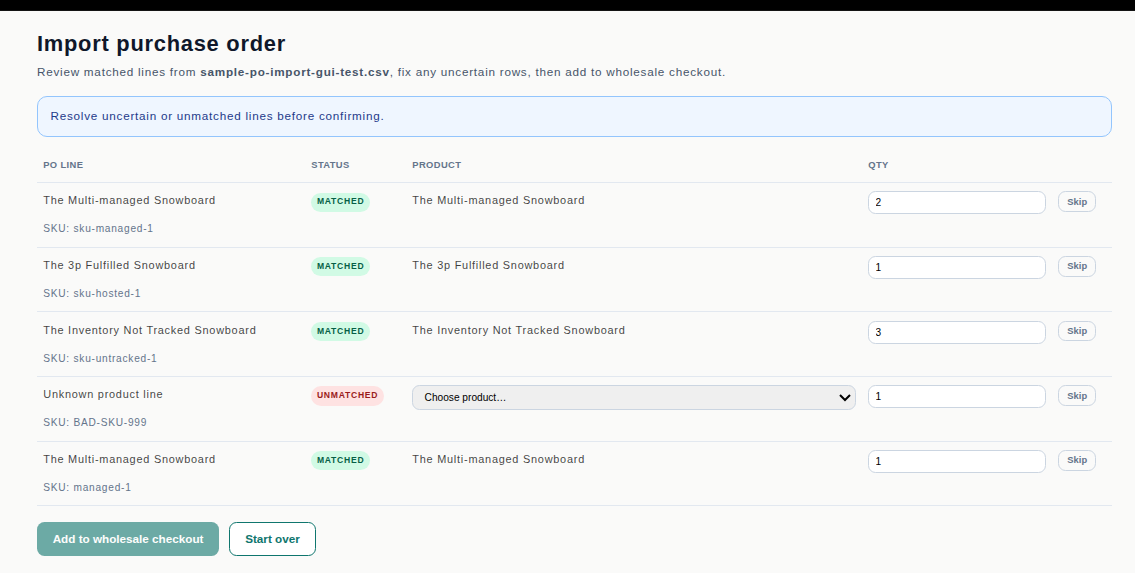
- A review screen before anything hits checkout—matched, uncertain, and unmatched lines
- Skip, restore, or start over without losing the session
- Same credit limit, MOQ, and case-pack validation as manual Quick Order
How it works in Wholesale Engine
Approved buyers open Import PO from the storefront nav or `/apps/wholesale-engine/po-import`.
Supported formats: CSV, XLSX, PDF (structured/tabular POs). After upload, buyers fix uncertain rows, trim lines to fit Net terms credit, and Add to wholesale checkout—the same batch submit path as Quick Order.
Merchant enables with `PO_IMPORT_ENABLED=true`.
Competitive note: SparkLayer markets an “Intelligent Cart” for PO upload; Wholesale Engine ships a comparable review-before-submit flow on standard Shopify plans.
See it in Admin / storefront